Why use a reverse proxy?
You'll want to use a reverse proxy if you want to use PostHog Cloud but still want tracking data to be sent first to your domain, then to us. This helps with tracker blockers or if you have migrated or are migrating off of PostHog open source hosted locally to PostHog Cloud.
Deploying a reverse proxy
Using Caddy
We like using Caddy because it makes setting up the reverse proxy and TLS a breeze.
docker run -p 80:80 -p 443:443 caddy caddy reverse-proxy --to app.posthog.com:443 --from <YOUR_TRACKING_DOMAIN>
You'll want to sub out YOUR_TRACKING_DOMAIN for whatever domain you use for proxying to PostHog. We'd suggest something like e.yourdomain.com or the like.
Using AWS CloudFront
CloudFront can be used as a reverse proxy. Although there are multiple other options if you're using AWS
NB Cloudfront doesn't forward headers, cookies, or query parameters received from the origin by default. PostHog uses query parameters in its URLs. You need an "origin request policy" as in the instructions below.
Create a distribution
- Create a CloudFront distribution
- Set the origin domain to your PostHog instance.
app.posthog.comfor PostHog cloud. - Allow all HTTP methods
- Create, and attach to the distribution, an "origin request policy" that forwards all query parameters
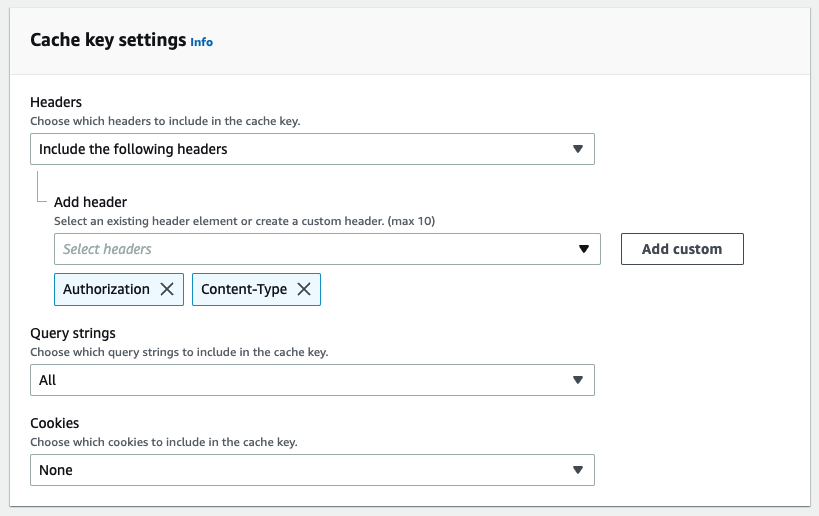
- In "Cache key settings" for the "Cache policy" set "Query strings" to "All".
- You may also need to set any headers your application needs as part of the cache key. For example the
AuthorizationorContent-Typeheaders.
- Choose the appropriate price class for your use
- Once the distribution is deployed set its URL as the api host in your JS snippet or SDK config
You can find out about CloudFront pricing on the AWS website
Community Slack user CJ Enright shared their AWS CDK code for creating this reverse proxy in our community slack. 100 🦔 points for them 💖!
You can view that here: https://gist.github.com/pauldambra/9af02d9ea42ffafcfc7c01dc38039958
Summary
That's it! A few resources here will go a long way. Reach out if you hit any snags!