• Product
  • Pricing
  • Docs
  • Using PostHog
  • Community
  • Company
  • Login
  • Table of contents

  • Handbook
    • Start here
    • Meetings
    • Story
    • Team
    • Investors
    • Strategy overview
    • Business model
    • Objectives
    • Roadmap
    • Brand
    • Culture
    • Values
    • Goal setting
    • Diversity and inclusion
    • Communication
    • Management
    • Offsites
    • Security
    • Brand assets
      • Team structure
      • Why Small Teams
      • Team App East
      • Team App West
      • Team Platform
      • Team Ingestion
      • Team Infrastructure
      • Team Marketing
      • Team Website and Docs
      • Team People and Ops
      • Team Customer Success
    • Compensation
    • Share options
    • Benefits
    • Time off
    • Spending money
    • Progression
    • Training
    • Feedback
    • Onboarding
    • Offboarding
      • Product Manager ramp up
    • Merch store
      • Overview
      • Engineering hiring
      • Marketing hiring
      • Operations hiring
      • Design hiring
      • Exec hiring
      • Developing locally
      • Tech stack
      • Project structure
      • How we review PRs
      • Frontend coding
      • Backend coding
      • Support hero
      • Feature ownership
      • Releasing a new version
      • Bug prioritization
      • Event ingestion explained
      • Making schema changes safely
      • How to optimize queries
      • How to write an async migration
      • How to run migrations on PostHog Cloud
      • Working with ClickHouse materialized columns
      • Deployments support
      • Working with cloud providers
      • Breaking glass to debug PostHog Cloud
      • Developing the website
      • MDX setup
    • Shipping things, step by step
    • Feature flags specification
    • Setting up SSL locally
    • Tech talks
    • Overview
    • Product metrics
    • User feedback
    • Scale features prioritization
    • Paid features
    • Releasing as beta
    • Overview
    • Overview
    • Personas
    • Testimonials
    • Value propositions
      • Content & SEO
      • Sponsorship
      • Paid ads
      • Email
      • Press
    • Growth strategy
    • Customer support
    • Inbound sales model
    • Sales operations
      • Managing our CRM
      • YC onboarding
      • Demos
      • Billing
      • Who we do business with
  • Table of contents

  • Handbook
    • Start here
    • Meetings
    • Story
    • Team
    • Investors
    • Strategy overview
    • Business model
    • Objectives
    • Roadmap
    • Brand
    • Culture
    • Values
    • Goal setting
    • Diversity and inclusion
    • Communication
    • Management
    • Offsites
    • Security
    • Brand assets
      • Team structure
      • Why Small Teams
      • Team App East
      • Team App West
      • Team Platform
      • Team Ingestion
      • Team Infrastructure
      • Team Marketing
      • Team Website and Docs
      • Team People and Ops
      • Team Customer Success
    • Compensation
    • Share options
    • Benefits
    • Time off
    • Spending money
    • Progression
    • Training
    • Feedback
    • Onboarding
    • Offboarding
      • Product Manager ramp up
    • Merch store
      • Overview
      • Engineering hiring
      • Marketing hiring
      • Operations hiring
      • Design hiring
      • Exec hiring
      • Developing locally
      • Tech stack
      • Project structure
      • How we review PRs
      • Frontend coding
      • Backend coding
      • Support hero
      • Feature ownership
      • Releasing a new version
      • Bug prioritization
      • Event ingestion explained
      • Making schema changes safely
      • How to optimize queries
      • How to write an async migration
      • How to run migrations on PostHog Cloud
      • Working with ClickHouse materialized columns
      • Deployments support
      • Working with cloud providers
      • Breaking glass to debug PostHog Cloud
      • Developing the website
      • MDX setup
    • Shipping things, step by step
    • Feature flags specification
    • Setting up SSL locally
    • Tech talks
    • Overview
    • Product metrics
    • User feedback
    • Scale features prioritization
    • Paid features
    • Releasing as beta
    • Overview
    • Overview
    • Personas
    • Testimonials
    • Value propositions
      • Content & SEO
      • Sponsorship
      • Paid ads
      • Email
      • Press
    • Growth strategy
    • Customer support
    • Inbound sales model
    • Sales operations
      • Managing our CRM
      • YC onboarding
      • Demos
      • Billing
      • Who we do business with
  • Handbook
  • Engineering
  • Setting up SSL locally

Setting up SSL locally

Last updated: Sep 07, 2022

On this page

  • Set up SSL via ngrok
  • Set up SSL via NGINX and a local certificate

Setting up HTTPS locally can be useful if you're trying to debug hard to replicate issues (e.g cross domain cookies, etc).

There are two ways you can get HTTPS locally:

  1. ngrok
  2. NGINX and a local certificate.

The easiest option is to use ngrok.

Set up SSL via ngrok

  1. Make sure you have ngrok installed.

  2. Sign up for an ngrok account (or sign in with GitHub) and run ngrok authtoken <TOKEN>

  3. Edit $HOME/.ngrok2/ngrok.yml and add the following after the line with authtoken: <TOKEN>:

tunnels:
django:
proto: http
addr: 8000
webpack:
proto: http
addr: 8234
  1. Start ngrok. This will give you tunnel URLs such as https://68f83839843a.ngrok.io
ngrok start --all
  1. Copy the HTTPS URL for the tunnel to port 8234 and set it as the value for the JS_URL environment variable. Then, start webpack:
export WEBPACK_HOT_RELOAD_HOST=0.0.0.0
export LOCAL_HTTPS=1
export JS_URL=https://68f83839843a.ngrok.io
yarn start
  1. Use the same URL as the value for JS_URL again and start the Django server
export DEBUG=1
export LOCAL_HTTPS=1
export JS_URL=https://68f83839843a.ngrok.io
python manage.py runserver
  1. Open the HTTPS URL for the tunnel to port 8000.

Tips & Tricks

If you're testing the Toolbar, make sure to add the ngrok urls to the list on the 'Project Settings' page.

Permitted domains

Also, watch out, network requests can be slow through ngrok:
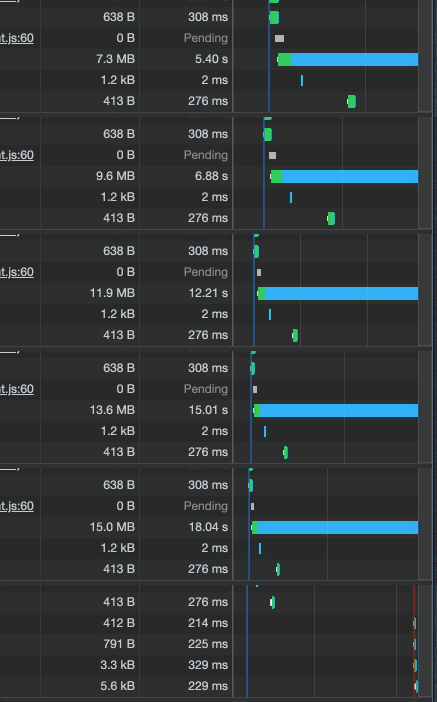
Network slow with ngrok

Set up SSL via NGINX and a local certificate

  1. Update openssl if "openssl version" tells you "LibreSSL" or something like that.

In case brew install openssl and brew link openssl don't work well, use /usr/local/opt/openssl/bin/openssl instead of openssl in the next step.

  1. Create key
openssl req -x509 -newkey rsa:4096 -sha256 -days 3650 -nodes \
-keyout localhost.key -out localhost.crt -subj "/CN=secure.posthog.dev" \
-addext "subjectAltName=DNS:secure.posthog.dev,IP:10.0.0.1"
  1. Trust the key for Chrome/Safari
sudo security add-trusted-cert -d -r trustRoot -k /Library/Keychains/System.keychain localhost.crt
  1. Add secure.posthog.dev to /etc/hosts
127.0.0.1 secure.posthog.dev
  1. Install nginx (brew install nginx) and add the following config in /usr/local/etc/nginx/nginx.conf
upstream backend {
server 127.0.0.1:8000;
}
server {
server_name secure.posthog.dev;
rewrite ^(.*) https://secure.posthog.dev$1 permanent;
}
server {
listen 443 ssl;
server_name secure.posthog.dev;
ssl_certificate /Users/timglaser/dev/localhost.crt;
ssl_certificate_key /Users/timglaser/dev/localhost.key ;
ssl_prefer_server_ciphers on;
ssl_session_cache shared:SSL:1m;
ssl_session_timeout 5m;
ssl_ciphers HIGH:!aNULL:!MD5;
location / {
proxy_pass http://backend;
proxy_set_header X-Forwarded-For $proxy_add_x_forwarded_for;
proxy_set_header Host $http_host;
proxy_redirect off;
proxy_set_header X-Forwarded-Proto $scheme;
}
location /static/ {
proxy_pass http://127.0.0.1:8234/static/;
}
}
  1. Add the following command to start nginx
nginx -p /usr/local/etc/nginx/ -c /usr/local/etc/nginx/nginx.conf
  1. You can stop the nginx server with
nginx -p /usr/local/etc/nginx/ -c /usr/local/etc/nginx/nginx.conf -s stop
  1. To run local development, use
bin/start-http

Questions?

Was this page useful?

Next article

Tech talks

We encourage engineers to give tech talks on topics they"re interested in/knowledgeable about. Here are our talks so far: "PostHog Cloud infrastructure" by James Greenhill "Let"s Talk About PyCharm" by Marius Andra "Approaches to scaling" by Karl-Aksel Puulmann "Databases 101" by James Greenhill

Read next article

Share

Jump to:

  • Set up SSL via ngrok
  • Set up SSL via NGINX and a local certificate
  • Questions?
  • Edit this page
  • Raise an issue
  • Toggle content width
  • Toggle dark mode
  • About
  • Blog
  • Newsletter
  • Careers
  • Support
  • Contact sales

Product OS suite

Product overview

Analytics
  • Funnels
  • Trends
  • Paths

Pricing

Features
  • Session recording
  • Feature flags
  • Experimentation
  • Heatmaps

Customers

Platform
  • Correlation analysis
  • Collaboration
  • Apps

Community

Discussion
  • Questions?
  • Slack
  • Issues
  • Contact sales
Get involved
  • Roadmap
  • Contributors
  • Merch
  • PostHog FM
  • Marketplace

Docs

Getting started
  • PostHog Cloud
  • Self-hosted
  • Compare options
  • Tutorials
  • PostHog on GitHub
Install & integrate
  • Installation
  • Docs
  • API
  • Apps
User guides
  • Cohorts
  • Funnels
  • Sessions
  • Data
  • Events

Company

About
  • Our story
  • Team
  • Handbook
  • Investors
  • Careers
Resources
  • FAQ
  • Ask a question
  • Blog
  • Press
  • Merch
  • YouTube
© 2022 PostHog, Inc.
  • Code of conduct
  • Privacy
  • Terms